Assetto Corsa PC Mods General DiscussionPC 

  • Thread starter Thread starter daan
  • 154,511 comments
  • 48,563,409 views
thank you for the help, now it looks amazing 🤩

But whit this just like the latest preview i get this errors, any clue on how too solve this?
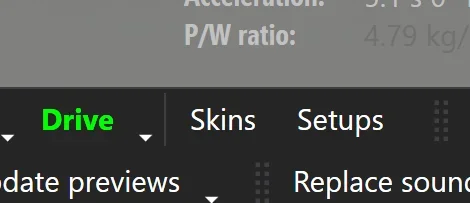
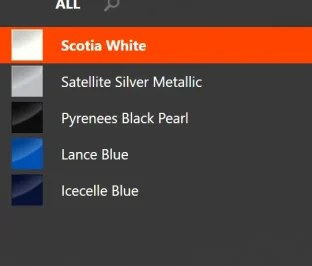
Go to Skins menu

1769870337851.webp

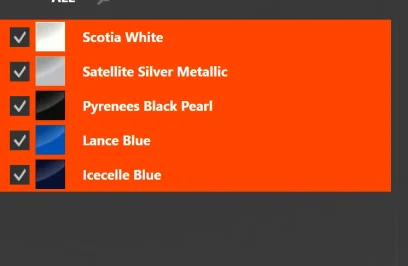
Select all on the left column (Shift and click on the last one)
1769870401762.webp 1769870417829.webp

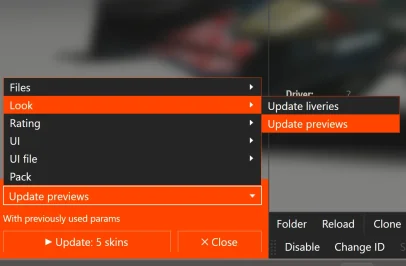
Then Update previews fromt he drop down menu at the bottom left

1769870470075.webp

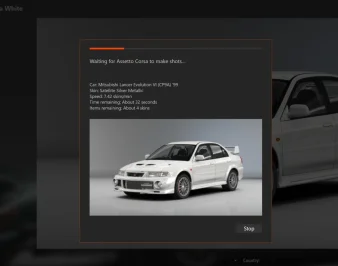
That way its updating each skins individually instead of in batch, takes longer but havent failed me yet for thos recent RSS/VRC one that pop that error

1769870559270.webp

(I know its not a RSS/VRC one, car is only to educational purpose)
 
Go to Skins menu

View attachment 1510148

Select all on the left column (Shift and click on the last one)
View attachment 1510149 View attachment 1510150

Then Update previews fromt he drop down menu at the bottom left

View attachment 1510151

That way its updating each skins individually instead of in batch, takes longer but havent failed me yet for thos recent RSS/VRC one that pop that error

View attachment 1510152

(I know its not a RSS/VRC one, car is only to educational purpose)
thanks for your help!
 
@Tetri: Working with AIWhisperer lately and have a few questions.

View attachment 1510129
Hey mate!

  • to share my settings, is it only settings.ini that needs to be shared?

there are 2 types of settings.ini files saved with Aiwhips.

The global settings are saved in the assettocorsa\apps\lua\aiwhisperer, with the app itself. It's important to save it before updating the app for a new version, cause that's definitly something i'd forget about and your settings file would be overwritten by mine. I suggest saving it somewhere and bring it back after an update.
The track settings are saved in the \content\tracks\whatevertrack you're using, including layouts\data.

Same where the ai_hints.ini are saved for the particular track/layout.

In example, for the WSC layout of the Monza 1966 track :


Capture d'écran 2026-01-31 144447.webp

If you would share the settings for a specific track, this is the file.
In my opinion, since i'm working on everything AI, like the fastlane.ai and the ai_hints.ini, this is a perfect spot as you would share the ai and data folders anyway, allowing you to share everything at once. AI whisp non-users would get that settings.ini file as well, the game would ignore it, no impact for non users.


As for the Global settings : AIWhisp is supposed to load all settings at start :
tracks settings first =>apply , if not existing fallback to
global settings => apply if not existing fallback to
Default settings (the ones AC would charge anyway).

Note that the prevent brakemistakes (default 1.0) and AIgrip (default 1.2) are locked at my values at start to make sure everyone is one the same page. i've seen - rare - cases or cars having ai.ini settings with aigrip at 1.5, and i prefered to have 0 brake mistakes while setting up the app to eliminate false negatives results while tweaking, where i would think the app values made the AI crash while a brakemistake was triggered randomly by the game.


  • Question: does saving settings as Track Specific have any influence on the settings previously saved as Global Settings? (and vice versa?) Or can I count on them remaining the same unless I intentionally overwrite?

Both are different, and saved in different places.

You save a car to global settings when you think you have the perfect combo of values and want them to be used everywhere. Aiwhisp will load them at start when no track settings can be found, ie working on a new track.

Exemple : you run Kunos GT40 vs Ferrari 330 at Stardust; You already made track settings for the Gt40 but only global ones for the Ferrari. The app would load track settings for Gt40 and global ones for Ferrari.

I am changing a few things atm for the saving system, so i'd suggest always saving all cars to track settings once you have a nice combo. Obviously to prevent an update overwriting your hard work, and be sure you would find those settings in the future.

Considering the considerable amount of changes incoming for next versions and their highly "AlpHaTesTINgGuiNEaPig" behavior, it's not off the table that you would rather use the version you currently have instead of the next update, so having those track settings secured would allow you to go back to a previous version and find your settings all clean and ready to run.


  • Question: Do I need to "Reload" Global settings each time I start a session? Can I reload global settings and then reload track specific settings after to pick up the cars that do have track specific settings (and leaving the others with the Global settings)?

Depends on the version you're using. Normally they should be loaded at start, but i would check and make sure they are. Usually it's easy to check by clicking right button on the main values tab, and see if the sliders at start are at default or edited value.

To make it simple to grasp, at start AI whisp would load tracksettings>globalsettings>default. So, if you have track settings saved for a car, it would be loaded instead of global settings.

I'll have a look and make sure everything goes smoothly on the matter for the next update (Automatically load track then global settings at start, which should be the normal behavior). I can't remember having issues with the track settings file anyway, as they were always properly loaded at start, but i'll give it a double check.


  • Another! Could we have separate settings.ini files for each of different car sets? Nice if we could just pick a carset from a list (or it auto selects the carset based on what it sees)
I think i misunderstand the question : you have a car tab that saves settings for a dedicated car type. You mean having different sets of settings you could pick up from for the same car type? or something else, sorry, i'm missing the point completely here😂


  • Suggestions! Can you get AIWhisperer to auto-select the tab for the focused car? (optionally?) Can you have the tabs go down onto a second row so all tabs are wider and readable? (Tabs get mighty small with lotsa cars)

hehe yeah that was discussed this month! This is being implemented. i'm guessing you are playing with 20 different WSC60 cars and the tabs are absolutly unreadable. So far my trick is to click on each tab until the "focused car" warning goes off, but i agree, it needs UI improvments. The only downside is that, using replays, you sometime need


- What do you think about transferring some of the found data back into the code for the car?

Nope! The modder might have intended the car to behave that way for his particular tracks. In my opinion, i would not let my app (or any app for the matter) to modify original files from a car. I'm also going for the torque/power LUTs and other acd files in the next batches, and the app can intercept and modify them on the fly, without touching anything in the original file.

That also makes sense looking forward for the AI apps that could be developped by others, and where AIWhisp would become obsolete. Better have your cars files untouched and ready for online, as AIwhisp already does.


-And are some of those settings ineffective or counter-effective when a real human is driving the car? Like steering gain (when the user is driving the same car as the ai)? Or do all the settings only affect ai drivers (and only when AIWHisperer is running)?

The car#0 (player's car) is unaffected by the changes when a human is driving it. I think on the version currently available it's not even affected by the main values changes, but i have to check on that since i updated this specifically for another user.

Anyway, the changes are strictly when AI is running, and only if the app is running 🙂


-So far I'm only working with two variables (mostly, sometimes the closer racing slider), brake hint and turn in (which seems to be corner-radius also) and am getting very good results. I'm staying away from adjusting grip and such (almost) and am finding no need to use them. Civilized ai racing! Apparently if all cars arrive at the corner and turn in correctly there's very little collision action, and even tidy two-wide through the turns! Still the occasional bumper bumped but I also use Stretched Grid keeping things clean. Two wide through the first chicane at Monza! Stoked, I am.


The side by side behavior and a few other little tweaks helps a lot. basically it tells the AI car to use slightly modified inputs reading from the fastlane when 2 wide. I also think it does a good job - most of the time. Glad you noticed!
The elasticaution, sadly on my end, was way too tricky to use, especially on custom fastlanes where the braking points are super precise. It works fine on "gentle" fastlanes, where everything was way too safe anyway in the first place.

I'm implementing other solutions (see below for the straigh lines ie).
If you wanna have a go at the next version that pushes the AI with gaspedal inputs and positioning, just ask in DM, i need testers anyway.


- Another thing, it seems that it's even better if the ai cars don't each have ai_default setups. Or at least they aren't necessary.


Ah! That's something that needs to be investigated. It is not related to AIwhisp.

I noticed there's a Race Engineer starting in the AC logs at startup and saw that the gear setups were... Almost properly chosen and applied to AI? There must have been a CSP change in the last versions, but i couldn't pinpoint it.

I never had much luck with the ai_default setup anyway, so that was very welcome.

I suppose ideally I'd drive all the cars and get good setups for them, then review/replace the track ai lines, and Then do the AIWhisperin' but NOT. Gettin closer to racing, not caught in a fixin-things loop.

At the moment i'm more about exploring all possibilities and let the user try to find its way with them. Pretty much no automation, just a bunch of sliders. I'm pretty sure it's the best way. Although most of my users would just drop it at first sigh - can't blame them-, the ones that actually dig a little into it can really improve their offline experience.


For example, i saved on almost all my cars these Zone1 modifiers :
Capture d'écran 2026-01-31 154824.webp


Then, using AIHINTSReader, apply Zone1 to all straights acceleration zones :


Capture d'écran 2026-01-31 155546.webp


I cannot stress this enough, only for ACCELERATION ZONES, so the Zone1 should def stops before braking zones, but anyway, with this simple mod, you have AI blasting on straights without slowing down if there's a car slower at front.
It also works at corner exits where an AI would not fully blast the gaspedal if there's someone at front, but there a little bit of try and error for those cases.

(Maybe we need to set up an AIWhisperer team to mow through all cars & tracks?)

Let's see where it goes! I'm in contact with other AI tweakers and they have different visions and ways, can't tell who's gonna come with an ultimate fix for AI.

Anyway, in my opinion, sharing AI whisperer settings for tracks can't harm if it makes the experience better.
 
F1 2026 car v0.1
View attachment 1363901

The car is experimental yet. At the release I did a big miss on hp (wanted to put 1000hp of pure ICE poewr and ended with 2000hp)


And the data.acd with no ERS modes and something realistic behaviour:


(please change the name to data.acd)

It's only experimental and not the final version! Next version will include better physics and some tweaks for decal mesh in the 3d model.

Physics by Cathay, 3d model by me and tires and suspension by Codemasters.
hi, is there some updated version for this mod? thank you
 
Track has been updated to version 0.975. Use the link in the quote to get the updated version.

You will definitely need to delete your old track folder first. The changes to the track itself are not significant, but the track setup has changed so I could add collision physics to the new walls for 2025. There are now separate layouts for each era. I hate that it has to be this way, but there were no other options.

Changes:

-- Separate layouts for 2025, 2013 and 2010. If you want to drive one of the older layouts, make sure to enable the track skin for that particular year. If you don't, the track surface and curbs will look like 2025. The 2023 track skin is meant to be used with one of the 2025 layouts. It changes the track surface back to before the resurfacng in 2024 and eliminates the Temple of Speed banner.
-- If you drive the 2013 layout and don't like the changes to the wall colors, go into the 2013 track skin folder and delete the walls-b.dds and walls-b3.dds files. This will make the walls green again. The colors were chosen from watching a youtube video of the 2013 GT Endurance race.
-- Worth mentioning again. The track is based off of the Kunos Monza track so you are free to use any mods (track skins, ai files, etc.) for that track with this one. Just don't overwrite the ext_config file. You can change or add anything to it, but do not delete the 'ROAD' or 'SKINS' section at the bottom or it will mess up how things work.

2025:
View attachment 1510062

2013:
View attachment 1510059

2010:
View attachment 1510060

Unless I or someone else runs across some small detail I missed in making all the layouts, this will be the last update until the track goes to version 1.0. That won't happen until I learn how to fix the Ascari area and widen out the turns in the first chicane for 2025. Since I have no clue how to do that at the moment, don't expect version 1.0 anytime soon.
Fantastic updates, track is superb, loving it. Just noticed that when driving at night the live action screens still show daytime, don't know if this could be fixed ? its not a deal breaker by any means but everything else is just perfect.

Regards

Mark
 
Hey mate!


(Maybe we need to set up an AIWhisperer team to mow through all cars & tracks?)

Let's see where it goes! I'm in contact with other AI tweakers and they have different visions and ways, can't tell who's gonna come with an ultimate fix for AI.

Anyway, in my opinion, sharing AI whisperer settings for tracks can't harm if it makes the experience better.
Thanks for the reply! Some food for thought in there... I'm on it. (As for bringing the whisperer data back to the car, I was thinking as a manual re-interpretation/re-implementation of data for a car's code based on what was found in Whisperer) (As for having different car sets, I was thinking that maybe when there's 3000 cars in the Whisperer database it's unruly to manage and maybe easier/smoother if working with a smaller set of car data. But I suppose Whisperer is doing that already by only working with/loading the cars it finds at the track.)
 
Last edited:
Fantastic updates, track is superb, loving it. Just noticed that when driving at night the live action screens still show daytime, don't know if this could be fixed ? its not a deal breaker by any means but everything else is just perfect.

Regards

Mark
The screens do get brighter at night so you can still see them, but on my end they don't look like daylight. I can play around with the numbers and see if I can make them darker without them showing just a black screen.
 
Are we unable/not allowed to edit the car.ini in the WSC 1.3 series? I tried making alterations to the Alpine A211 and increased the FFB multiplier, but when i packed the car in CM it then comes up with this failure (on trying to load a race)

Custom Shaders Patch v0.2.12-preview1

Failed to decrypt model
"content/cars/wsc_legends_alpine_a211/wsc60_alpine_a211.kn5":

. Failed to decrypt texture "damage_nm.dds".

Model won't look properly. Please make sure you're using latest
version of Shaders Patch and model itself is not damaged.

Would you want to continue?

Yes
No

....At that point if you continue it then looks like a crystal car (obviously, as im typing this, its encrypted isnt it?). Marvellous.
 
24H
Doran JE4 1.1 should be this one


Release of the CSP preview settings 01-2026

Preset: https://acstuff.club/s/loda
Showroom: https://www.mediafire.com/file/ot02bbw1z0dsitu/tav_moderna.7z/file

Please do a backup if you already have the TAV Moderna showroom
Extract to your assetto corsa showroom folder: Steam\steamapps\common\assettocorsa\content\showroom

View attachment 1509849View attachment 1509850View attachment 1509851View attachment 1509852

Well, this is not the first time I see some amazing previews and they just don't work on my setup. There's just a random blue veil like we would see on encrypted cars without CSP, and the car is just hugely misaligned on the generated preview. What am I doing so wrong?!

Already tried with both "CSP Final Render" thing on and off. I'm on latest CSP preview.
 
Last edited:
Are we unable/not allowed to edit the car.ini in the WSC 1.3 series? I tried making alterations to the Alpine A211 and increased the FFB multiplier, but when i packed the car in CM it then comes up with this failure (on trying to load a race)

Custom Shaders Patch v0.2.12-preview1

Failed to decrypt model
"content/cars/wsc_legends_alpine_a211/wsc60_alpine_a211.kn5":

. Failed to decrypt texture "damage_nm.dds".

Model won't look properly. Please make sure you're using latest
version of Shaders Patch and model itself is not damaged.

Would you want to continue?

Yes
No

....At that point if you continue it then looks like a crystal car (obviously, as im typing this, its encrypted isnt it?). Marvellous.
Maybe you can do the data overide if you are only modding the FFB, but there is an app for that, why not just do that then?
 
Are we unable/not allowed to edit the car.ini in the WSC 1.3 series? I tried making alterations to the Alpine A211 and increased the FFB multiplier, but when i packed the car in CM it then comes up with this failure (on trying to load a race)

Custom Shaders Patch v0.2.12-preview1

Failed to decrypt model
"content/cars/wsc_legends_alpine_a211/wsc60_alpine_a211.kn5":

. Failed to decrypt texture "damage_nm.dds".

Model won't look properly. Please make sure you're using latest
version of Shaders Patch and model itself is not damaged.

Would you want to continue?

Yes
No

....At that point if you continue it then looks like a crystal car (obviously, as im typing this, its encrypted isnt it?). Marvellous.

Doesn't work with all data files, but create a data_override folder in the extension folder (can also be done on a per skin basis) and put the new car.ini in there.

I can't remember if it works with car.ini but it works with several files.
 
Maybe you can do the data overide if you are only modding the FFB, but there is an app for that, why not just do that then?
Doesn't work with all data files, but create a data_override folder in the extension folder (can also be done on a per skin basis) and put the new car.ini in there.

I can't remember if it works with car.ini but it works with several files.
Yeah i did exactly that - i just edited it by increasing it in game. Call me weird and OCD but i just like to keep those in game settings all at 100% FFB wise. I like tuning the car.ini FFB file precisely. Thanks for your tip Rodger, i'll give that a go tomorrow and see if that does the trick!
 
Well, this is not the first time I see some amazing previews and they just don't work on my setup. There's just a random blue veil like we would see on encrypted cars without CSP, and the car is just hugely misaligned on the generated preview. What am I doing so wrong?!

Already tried with both "CSP Final Render" thing on and off. I'm on latest CSP preview.
using csp preview 140 solved it for me
 
As for bringing the whisperer data back to the car, I was thinking as a manual re-interpretation/re-implementation of data for a car's code based on what was found in Whisperer


For these situations, it' s worth reaching the car creator so it can be integrated in their next update! I try to keep the modders i reach happy / involved, so it's cool to have the app work on its own and leave car data untouched, and let them decide wether it's worth to implement or not. In the past, I had some... little frictions with creators i modified work from? Better avoid the situation altogether.


As for having different car sets, I was thinking that maybe when there's 3000 cars in the Whisperer database it's unruly to manage and maybe easier/smoother if working with a smaller set of car data. .


The "settings" is a text file, barely a few kilobytes even if you were to preset 2000 cars. It is read and cached at start, with the app only checking for cars used in the session. No impact on perfs or your SSD for the file😉.

Atm with more than 200 cars presets in my version, the file is 31kb😁.
 
Last edited:
I think I might have asked this before but I can't remember. When I'm trying to download a file and I keep hitting errors, ff you hit Try Again and it won't move past it so I hit skip and it goes to the next, skip, to the next etc., is that what you're supposed to do? Or when you hit the first one and try again doesn't work just cancel the operation and forget about it? The file in question is Pyyer's Daytona 2026 extension and it probably had 8-10 errors so I skipped them all and obviously the extension didn't install. This was the first one.

 
Nsnd


Please can you try the attached fix, let me know?


Count me in. If you find good hints that we should add to the default cars, that'd be great. Parrilla didn't have time to tune the latest ones so input would be appreciated.
Worked for me, was having the issue as well (latest CSP). Thanks!

Before
1769902059338.webp


After
1769902044299.webp


I seem to have the opposite issue with the mustang in the same pack though. Shadows in preview look correct, but in custom showroom the shadow gets squared off and doesn't totally match the car (updating ambient shadows doesn't fix it)

1769904506142.webp


1769902184970.webp
 
Last edited:
In these particular cases:
beware of any "app" that has obufucated/encrypted "code"
encrypted cars/tracks are not an issue, extension LUA shoud be cleartext (see previous point)
download from trusted/known modders
beware of "odd" behavior (game hang on start in particular)
apps/mods should not connect to any external hosts
note: the Reddit thing is certainly refering to one of many lame PP filters out there, stay away from them as I do

It is your due diligence to know what you install.
Anti-virus will likely NOT catch the static code, but might when it connects/exfiltrates to an unknown host

I cant list all the exceptions as variations are many and particular... be safe out there

@SB1 your probably ok, I have as many as you. Dont throw it all away bro
:)
"Apps/mods should not connect to any external hosts"

Meanwhile I have seen GTA 5 mods that literally phone home to see if you paid on patreon lmao
 
Last edited:
after watching this ,i wonder why ai is worst 10 years later !!

I imagine that, given the age of this video and the fact that it’s official content from Kunos, the game didn’t have Sol, Pure, or CSP yet. Am I correct?
 
Logically, both, because some models don't exist, like the M4 at RSS.
When I ask this, it's mainly for the 296 and the Mustang, which can be found at Chemmflumi, LP Design (Mustang), RSS, and URD.
the M4 EVO will be released by RSS soon. They have another release first, then the M4 most likely.
 
hello im lookin for a link to what somebody did ambient lighting for various ac tracks, like bathurst was one of them i remember, ive had to format my pc and cant seem to find where i got it from. hope someone can help. it had the building at the bottom of the back straight all lit up the one i had, sure riverside was in the file too. thanks guys.
 
I imagine that, given the age of this video and the fact that it’s official content from Kunos, the game didn’t have Sol, Pure, or CSP yet. Am I correct?
almost sure it didnt have them but i wasnt around back them ,only started ac this year but ai is so important for me. we have like almost every racing series... we just need to polish it...
 
Sharing a mod? Host it on GTPlanet Downloads. Free, public hosting for files up to 10GB in size.

Latest Posts

Back