

- 2,346

- Germany
Another chance, install these cars manually and not with CM. I sent you a PM.no chance with these cars. Tried both ways
Another chance, install these cars manually and not with CM. I sent you a PM.no chance with these cars. Tried both ways

I don't have experimented with that TRAIL_HINT value yet.Thanks for the info. Could be a little of both. I had some success making it better by reducing the GAS_BRAKE_LOOKAHEAD value from 10 to 0 (the other cars I compared it to had this at 0). They still run off the track from time to time, but not every time like before. I'll also compare suspension files to see if I see anything there.
BTW, i've seen the TRAIL_HINT value vary widely between different cars. The ones that seem to work the best have it at 1, others have it really low, like 0.29. Do you know which is better, higher or lower?


Oh sorry, it's fine now !


There was a weird glassy/holographic effect in VR when some trees overlapped previously, which now seems fixed. Might be related to that.428 is pretty good except for the blurring of the tree textures. I haven't been able to figure out what new option he added to fix\disable that effect because it looks terrible.

That's possible. When I have more time this weekend, i'll dig deeper or just ask for help on discord. For now, i'm just using an older version until I can figure it out.There was a weird glassy/holographic effect in VR when some trees overlapped previously, which now seems fixed. Might be related to that.

 i already checked that one

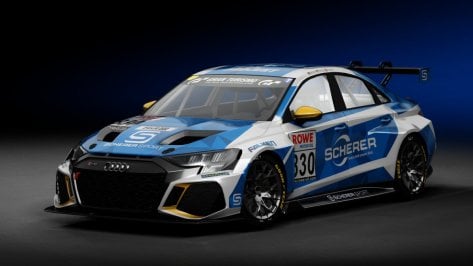 I downloaded a file named TCR.7z (damned if I can find it now) that had an audi RS3 that works with this skin! Touring car folks probably already have the car...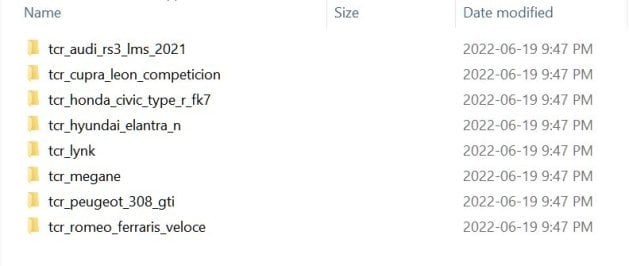
No, but I'll gladly have a copy of it please when you do find it.I dl'd this skin from Race Dept on Sun. 15th, I can't find the car it goes with. (can't find the skin there anymore either) Anyone know what car this is? (Audi A4, the skin dl was "NLS_#830_SchererSport.rar")
View attachment 1296573


i think its this?I dl'd this skin from Race Dept on Sun. 15th, I can't find the car it goes with. (can't find the skin there anymore either) Anyone know what car this is? (Audi A4, the skin dl was "NLS_#830_SchererSport.rar")
View attachment 1296573


i dont think so, noDo you already have MOD sound update?

They are all really subpar. I think the one on RD is the best, but comparing to the AMS2 version is hugely unflattering.What's the best version of current-day Jerez around ?
Except of Jerez, I also dont like the versions of Aragon and Portimao. Three tracks I personally really like in real life. And Im pretty sure I have tried all of the versions out there. Would be happy if someone brought them (in todays stadards) to AC.They are all really subpar. I think the one on RD is the best, but comparing to the AMS2 version is hugely unflattering.
RaceDepartment Jerez by Alex Meyer
Inaccurate corners and elevation changes, and the AI is deathly slow.
Unfortunately, this is the best one. It's one of the major holes in the AC track library. I just drive AMS2 if I want to do Jerez.
An excellent scratch-built Portimao is nearing completion if you can wait a little while longer.Except of Jerez, I also dont like the versions of Aragon and Portimao. Three tracks I personally really like in real life. And Im pretty sure I have tried all of the versions out there. Would be happy if someone brought them (in todays stadards) to AC.


How are we really supposed to know why your getting 60 FPS? There are a thousand settings. Hundreds of check boxes and sliders. With your hardware you have, you could get 13 FPS or 120 FPS depending on what your settings are. We don't even know what resolution you're using to start with.Hi I would like to let you know about a problem I am having with Assetto.
I have a rather efficient PC but I cannot exceed 60 fps in races with 30 AI. I realized that my CPU and GPU are only running at 30%.
Do you know if an adjustment is restricting the machine ?
My config is as follows:
AMD Ryzen 7 3700
Nvidia GTX 3070 TI
32 GB of RAM

Try to rename the folder and remove all capital letters. Same goes for spaces. Both can't be processed when generating new previews with CSP enabled. Just remember to edit both files within the sfx folder accordingly.you know whether there is any chance to create previews for cars with that error?
CSP preview is not working with these cars
View attachment 1296330


good luck with the exams!Since I've been quiet for a while now, I'd like to give a short progress update of my work on the Ultima, Mantis, Vertigo and BMW.
I currently have not much time to work on the Ultima and the updates for the three other cars, as I am writing an exam at the beginning of November and also have another exam at the end of November. Accordingly, I am preparing for the exams in the free time I have available. If there is still a little time left, I still work on the cars in small steps. I'm currently remodeling the side air intakes of the UItima because I didn't like in the last version and it wasn't entirely correct. So be patient a little longer. The work goes on, but slowly. And once again a big thank you to everyone who supports me with the cars, be it bug reports or AI fixes, for example. No matter how and no matter what, I am grateful for any help.
Do you achieve higher fps with less AI ? Or is it always 60? If you are running at 30% cpu and gpu I'm guessing there is just a fps limit turned on somewhere (in CM: Assetto Corsa - Video - Limit framerate and in NVidia control panel : Max Frame Rate and Background Application Max Frame Rate). Also check Vertical Sync is off (if you have that on and your monitor is set to output 60Hz it will also cap your fps at 60 if not mistaken).Hi I would like to let you know about a problem I am having with Assetto.
I have a rather efficient PC but I cannot exceed 60 fps in races with 30 AI. I realized that my CPU and GPU are only running at 30%.
Do you know if an adjustment is restricting the machine ?
My config is as follows:
AMD Ryzen 7 3700
Nvidia GTX 3070 TI
32 GB of RAM
Thank you for your comeback
Thank you for the update. Would it be somehow possible to incorporate all the variants from the Legion version?I implemented the 2019 sponsors and texture updates by Pepperoni in a small update of Croft 2019.
I also did a few small fixes.
Croft 2019 - Updates
www.racedepartment.com

All good hereHi guys,
just wanted to know if you are also experiencing an error when using the CSP showroom with the latest version of CSP 1.80 preview 428. I had to downgrade to load the showroom with the option "use CSP showroom" ticked.
Thanx for your feedback.
Daniel
I think Zwiss's Algarve (zw_algarve) is pretty good. I believe the source was Grid Autosport, which of course won't have exact mesh precision, but it has the "big feel" it needs and the way the FFB ramps up in the undulating S2 is very cool. I generally drive the RSS 90's Prototypes there.Except of Jerez, I also dont like the versions of Aragon and Portimao. Three tracks I personally really like in real life. And Im pretty sure I have tried all of the versions out there. Would be happy if someone brought them (in todays stadards) to AC.

Welp, maybe never mind then on that AI update.An excellent scratch-built Portimao is nearing completion if you can wait a little while longer.
From what I recall, AC is unfortunately not optimized for multi-core CPUs like yours. Everything runs on only one core, so single-core performance is king. The Zen 2 processors like the 3700 you have are notoriously weak single-core CPUs - fantastic for multitasking and for (rare) multi-core optimized video games - not so good for the much more common single-thread reliant applications like AC.Hi I would like to let you know about a problem I am having with Assetto.
I have a rather efficient PC but I cannot exceed 60 fps in races with 30 AI. I realized that my CPU and GPU are only running at 30%.
Do you know if an adjustment is restricting the machine ?
My config is as follows:
AMD Ryzen 7 3700
Nvidia GTX 3070 TI
32 GB of RAM
Thank you for your comeback

Thank you for your detailed analysis !! Indeed you must be right the problem must be at this level. The crazy thing is that until now I didn't find it problematic but a few days ago my PC started running the game at 140 fps easily for no reason and everything is came back as before...From what I recall, AC is unfortunately not optimized for multi-core CPUs like yours. Everything runs on only one core, so single-core performance is king. The Zen 2 processors like the 3700 you have are notoriously weak single-core CPUs - fantastic for multitasking and for (rare) multi-core optimized video games - not so good for the much more common single-thread reliant applications like AC.
Open up Afterburner and take a look at the readout - make sure to enable each CPU core in the overlay, and CPU0 in this case is the one to watch. Keep in mind that the "Overall" CPU usage isn't helpful in this case - the rest of your cores could lay dormant, while CPU0 is overloaded - and it would still show as something like 30%.
If the slowdowns are happening because your CPU0 is overloaded (99%), that means that you'll likely have to lower the AI count. I can get slowdowns in a field of 24 if AI get into a huge accident on my 9900K 5 GHz, which is a significantly stronger single-core performer.
I'm going to watch it all this weekend thank you very much !!Do you achieve higher fps with less AI ? Or is it always 60? If you are running at 30% cpu and gpu I'm guessing there is just a fps limit turned on somewhere (in CM: Assetto Corsa - Video - Limit framerate and in NVidia control panel : Max Frame Rate and Background Application Max Frame Rate). Also check Vertical Sync is off (if you have that on and your monitor is set to output 60Hz it will also cap your fps at 60 if not mistaken).


