Assetto Corsa PC Mods General DiscussionPC 

  • Thread starter Thread starter daan
  • 152,036 comments
  • 46,492,838 views
Unpopular opinion: noob remark I got pure and i think I prefer racing with the default setting. There is to much option with the pure config that I don’t know if it is that important to have the best looking game. If at the end, I just want to race. Pure seem awesome for picture or replay but I don’t see how cool it is just for driving?
That a very good point, but also hope that @Peter Boese will include some pre-settings, like best performance for VR users, for low spec hardware and “state of the art” systems etc. Etc.
 
Last edited:
Hi,

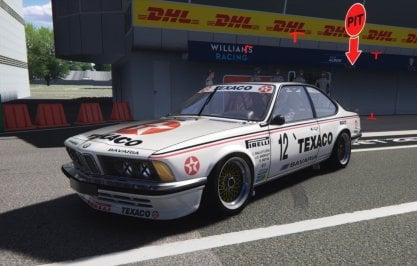
For those who want new skins for Tommy78 BMW 635 DTM, here are some with several modifications (side exhaust, new wheels works with CSP) :
I modified suspension to have better visual (and moved a bit front brake calipers for new wheels), you have to unpack data to install it.
Maybe it's not 100% accurate because I had to create some logos from scratch, but it's better than nothing :)

View attachment 1389941

HARTGE

View attachment 1389942

JAGERMEISTER

View attachment 1389943

TEXACO

+ stock "MULLERBRAU" skin with BMW logo : MULLERBRAU
Nice! Good thing that I also made the Jägermeister.. :lol:
 
Hi,

For those who want new skins for Tommy78 BMW 635 DTM, here are some with several modifications (side exhaust, new wheels works with CSP) :
I modified suspension to have better visual (and moved a bit front brake calipers for new wheels), you have to unpack data to install it.
Maybe it's not 100% accurate because I had to create some logos from scratch, but it's better than nothing :)

View attachment 1389941

HARTGE

View attachment 1389942

JAGERMEISTER

View attachment 1389943

TEXACO

+ stock "MULLERBRAU" skin with BMW logo : MULLERBRAU
Thanks, but the tyres are screwed with your skins.
1726595959184.png
 
@Breathe, as a quick note, I'm missing about ~70% of the icons for addendums/extensions in the most recent version of the Track List. All sources (Mega, Mediafire, GTP, Overtake, etc.) are affected.


Latest Firefox, tweaking settings and AdBlock did nothing. Switching to a Chromium browser does nothing either.


EDIT: Also, it might be wise to link Mike08's Patreon page for the Autopolis update, rather than the Overtake link which leads to a now deprecated version.
 
Last edited:
Strange, width and radius of the new rims are in the ext_config of each skin so I can't explain what is your issue if you have used all my files ...
I installed some update / improvement which were shared some days ago, maybe that´s the reason for. Maybe someone else can check it too, otherwise I just delete the ext_config from your skin folder.

Edit: decreased the value of the diameter from 0.243 to 0.200 and now it´s fine.

1726597342147.png
 
Last edited:
I installed some update / improvement which were shared some days ago, maybe that´s the reason for. Maybe someone else can check it too, otherwise I just delete the ext_config from your skin folder.

Edit: decreased the value of the diameter from 0.243 to 0.200 and now it´s fine.

View attachment 1389967


I'm very surprised because you have below the result ingame for me with my settings
I'm curious to see if everyone has the same problem as you.

Sans titre-1.jpg
 
Last edited:
at first glance, everything is absolutely normal for this type of car
STEER_LOCK=450
STEER_RATIO=16.0
except that the value
LINEAR_STEER_ROD_RATIO=
was not quite accurate, but not critical.
but there are problems with the car's performance, the mod specification states a maximum speed of 260 km/h, in the mod description 245 km/h, in practice, on 2000 meters of drag racing I was able to reach only 215 km/h.
I just did a lap of the Targa Florio and hit 238km/hr down the straight (give or take 1kph because it's hard to read the speedo when it is so far offset from the driver) with wind set to zero. I was running the highest gear ratio and I reckon if I ran a slightly lower one I would top 240, maybe hit that 245. 260kph might be highest gear ratio at max rpm, so you could hit that downhill or with a tailwind.

Note: I had terrible ffb in the mod with a crazy high self-centering force but editing the STEER_ASSIST from 0.5 to 1 sorted that all out for me in case anyone else has tried it and had the same problem.

This is such a good-looking fun car and I've been really enjoying just driving with two-way 60s traffic cars around the Targa Florio as well, though the car will lap inside 40mins hotlapping in perfect conditions.
 
Note: I had terrible ffb in the mod with a crazy high self-centering force but editing the STEER_ASSIST from 0.5 to 1 sorted that all out for me in case anyone else has tried it and had the same problem.
Ah! I had this exact same issue. I solved it by bringing the ffb gamma to 2.4, a band aid since it keeps the setting for other cars, glad that i wasn't the only one noticing it.
That completely ruined the experience at first try, to my utter sadness considering the quality of everything else.

Thanks for the tip, now where do you guys find this config file to edit 😆?
 
I installed some update / improvement which were shared some days ago, maybe that´s the reason for. Maybe someone else can check it too, otherwise I just delete the ext_config from your skin folder.

Edit: decreased the value of the diameter from 0.243 to 0.200 and now it´s fine.

View attachment 1389967
Yes, that's probably my fault, if you applied my update. It uses a different rim diameter than the original, that's why the rim replacement doesn't work right. I'm not too familiar with the procedure used in @Alis_70 skins, but the update brings 16" rims, which would have 0.203 m radius, so using that value in the skin ext_config seems to solve it.
 
Evening all, ive gone back and started racing some retro Le Mans content and i seem to remember there was a fix for this floating around but cant seem to find it - I need a fix for a wallowy, moving around windscreen wiper for the URD Mercedes CLK, on the straights its driving me nuts!
 
Unpopular opinion: noob remark I got pure and i think I prefer racing with the default setting. There is to much option with the pure config that I don’t know if it is that important to have the best looking game. If at the end, I just want to race. Pure seem awesome for picture or replay but I don’t see how cool it is just for driving?
The question is, why do you need to set something with pure? Just use the default settings and the pure PPfilter. You just don't set something with default weather style because there are no settings in game. It is mostly a tech demo.

So just ignore the fact that there is a pure config app and try the default settings and you are good to go.

Ah and btw, if it's just for racing: because of the skydome it is more efficient and therefore you get more fps and frame flow is more equal.
 
Last edited:
I have textures clipping with some cars and (I don't really understand why) more with some tracks than others
and the entire car seems to shake a little bit.
For example, with sx_lemans track, it's horrible, and many of other tracks this issue is less important.

Does someone could solve this issue ? if I haven't this issue in several tracks, I think it's not an issue from the car itself ...

Below with the new URD DALLAS at Le Mans :
Sans titre-1.jpg
 
The question is, why do you need to set something with pure? Just use the default settings and the pure PPfilter. You just don't set something with default weather style because there are no settings in game. It is mostly a tech demo.

So just ignore the fact that there is a pure config app and try the default settings and you are good to go.
I keep going back to the regular pure filter/candy because it just looks great and just works. Other filters sometimes look too dark etc.
 
I have textures clipping with some cars and (I don't really understand why) more with some tracks than others
and the entire car seems to shake a little bit.
For example, with sx_lemans track, it's horrible, and many of other tracks this issue is less important.

Does someone could solve this issue ? if I haven't this issue in several tracks, I think it's not an issue from the car itself ...

Below with the new URD DALLAS at Le Mans :
View attachment 1389982
It's z-fighting, and the reason it's more prominent with some tracks than others has to do with the precision of the depth buffer. On large tracks, the depth buffer will often be less precise because it has to be larger than on smaller tracks. For objects that are really close, a small change in the depth buffer precision like this can trigger z-fighting on some tracks, while others are just fine. Not really a track problem, and not really a car problem - just a synergy of bad luck. (Someone smarter than me explained it to me some time back.)

There are settings in CM that can aid in this, but I can't come up with any specific advise right now.

For reference, I have no similar problems with the same car on the same track, and I'm just running default settings for everything that should matter. And the Dallas/Cadillac is a really nice car. :)
 
It's z-fighting, and the reason it's more prominent with some tracks than others has to do with the precision of the depth buffer. On large tracks, the depth buffer will often be less precise because it has to be larger than on smaller tracks. For objects that are really close, a small change in the depth buffer precision like this can trigger z-fighting on some tracks, while others are just fine. Not really a track problem, and not really a car problem - just a synergy of bad luck. (Someone smarter than me explained it to me some time back.)

There are settings in CM that can aid in this, but I can't come up with any specific advise right now.

For reference, I have no similar problems with the same car on the same track, and I'm just running default settings for everything that should matter. And the Dallas/Cadillac is a really nice car. :)
Thank you, but I'm not sure if I have understand, so what setting I can change / disable to solve this issue ?

Edit: sorry I didn't read all your post, if you have more information to solve it I'm interessested.
And good to see you don't have this, so I hope I will solve this soon ...
 
Last edited:
DTM 2019 Skinpack Aston Martin

Aston Martin Vantage GT3 version ACC by Binary Motors
https://modsfire.com/dBjS3Fqgen4PhT8

New kn5 and ext_config by files @spagna for:
  • removed a bunch of number plates
  • some minor graphic improvements outside and inside the car

DTM 2019 Skins for the GT3 Aston Martin.

I choosed this one in lag of a decent 3d-Model of the right car. I think it´s the beste choice.


R-Motorsport 1
#3 Paul di Resta
preview.jpg


#76 Jake Dennis
preview.jpg


R-Motorsport 2
#23 Daniel Juncadella
preview.jpg


#62 Ferdinand von Habsburg
preview.jpg


to get the best competition, I swapped the physics with one of the cars from URD T5 2018 DTM Pack. if there is interest, i can upload the data.acd two.
 
That a very good point, but also hope that @Peter Boese will include some pre-settings, like best performance for VR users, for low spec hardware and “state of the art” systems etc. Etc.
You should test the "Natural Mod PP Filter". It now works perfectly with Pure LCS.

Since the last update to version 30 the sunblinding and night lighting works perfectly with Pure LCS 2.15 and CSP 0.2.5-preview1. And with all functions like sunblinding now working with Single Pass Stereo in VR the performance is fantastic with my Oculus Rift CV1, even at night with rain. Just test it.
 
Ah! I had this exact same issue. I solved it by bringing the ffb gamma to 2.4, a band aid since it keeps the setting for other cars, glad that i wasn't the only one noticing it.
That completely ruined the experience at first try, to my utter sadness considering the quality of everything else.

Thanks for the tip, now where do you guys find this config file to edit 😆?
Unpack Data -- car.ini -- (controls) -- save -- Pack Data -- ENJOY!
 

Attachments

  • Screenshot 2024-09-17 175856.png
    Screenshot 2024-09-17 175856.png
    12.9 KB · Views: 15
  • Screenshot 2024-09-17 175921.png
    Screenshot 2024-09-17 175921.png
    3.9 KB · Views: 18
  • Screenshot 2024-09-17 175937.png
    Screenshot 2024-09-17 175937.png
    4.9 KB · Views: 17
so you could hit that downhill or with a tailwind.
I have no doubt that downhill, and even with a tailwind, it will go 245. But as a rule, measurements of maximum speed are not carried out while going downhill. In any case, my goal was not to somehow belittle this mod, I just hoped that the author, having learned about this, will correct it in the next update, if there is one.
 
Under the CSP 'TRACK ADJUSTMENTS' options, I have always had Trees A2C dithering enabled. I have recently discovered that when you turn that option off, the seasonal trees I use on some of my track mods make the trees look almost transparent in the fall, winter and spring. I made alternate versions that thicken the alpha layer for the tree textures so that they look filled in more and less transparent. I don't know how many people actually use the Seasonal Trees skins I include, but if you do and you don't have Trees A2C dithering enabled, you might find you like these alternative versions better. The trees won't seem as transparent.

This is where it gets confusing. Download the update from the link below. This does not replace the existing 'Seasonal' track skin, but adds an additional 'Seasonal2' track skin with the thicker alpha layer textures. Also, since you may not be using all of these tracks, you may need to install them individually into their respective track folder. When extracting, overwrite when it asks.

I think I included all of the tracks I've done seasonal textures for, but if someone comes across one I missed, please let me know.

RJ_tracks_seasonal_textures_update
 
I have no doubt that downhill, and even with a tailwind, it will go 245. But as a rule, measurements of maximum speed are not carried out while going downhill. In any case, my goal was not to somehow belittle this mod, I just hoped that the author, having learned about this, will correct it in the next update, if there is one.
Just click on it and put the fastest you go, 260 being the theoritical max speed of the longest 5th gear available...

1726624257467.png
 
Last edited:
Just click on it and put the fastest you go, 260 being the theoritical max speed of the longest 5th gear available...

View attachment 1390037
edit:

Okay, maybe I was a little rude, I'll explain it differently. I don't want to change the numbers in the "maximum speed" column, I want the car to be able to reach the stated maximum speed (245), on a straight, level section (without hills, slipstream and tailwind) that's what I wanted to convey to you.
 
Last edited:

X90
@Breathe, as a quick note, I'm missing about ~70% of the icons for addendums/extensions in the most recent version of the Track List. All sources (Mega, Mediafire, GTP, Overtake, etc.) are affected.


Latest Firefox, tweaking settings and AdBlock did nothing. Switching to a Chromium browser does nothing either.


EDIT: Also, it might be wise to link Mike08's Patreon page for the Autopolis update, rather than the Overtake link which leads to a now deprecated version.
Following maintenance of overtake.gg, the RaceDepartment/Overtake add-ons icons have disappeared.It will take me months to change them. (I'm looking for a way to change them into batch...)

Thanks for the Autopolis, I updated to the latest version but forgot to change the link. (I was a little too confused by this icons problem)
 
Sharing a mod? Host it on GTPlanet Downloads. Free, public hosting for files up to 10GB in size.
Back