Assetto Corsa PC Mods General DiscussionPC 

  • Thread starter Thread starter daan
  • 151,504 comments
  • 46,235,422 views
Hi folks,

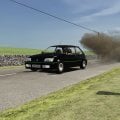
i want finish one of my speedy project of DTM but im not able to rework in 3d part of the bodies

View attachment 1221243

need some widing body
324074566_1938084269865567_6400106437245659132_n.png


Anyone who can helps sends me a PM in this forum or FB Claudio Cas.
many thanks
View attachment 1221244
Ha ha, I really like this idea. The Alfa 155 was based on the FIAT Tipo platform in real life, i guess you might of already known this but some may not have.
Also the Alfa Q4, the AWD variant is basically a Lancia Delta with Alfa 155 body on top....
FIAT re wrote the rules on parts bin cars.
The British started it though, there is a funny tale of what the original Land Rover had as rear lights, sure they were taken off an Austin A35 or something. The 1st generation Land Rover defender had door handle's of a Sherpa Van amongst other things.

And obviously everyone knows that the 2nd and 3rd generation VW Beetles are basically Golf's underneath the women's clothing.
Real life car manufacturing is a lot like modding.... just nicking stuff off other stuff including whole chassis and body swaps...
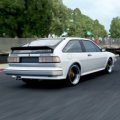
 
And obviously everyone knows that the 2nd and 3rd generation VW Beetles are basically Golf's underneath the women's clothing.
Real life car manufacturing is a lot like modding.... just nicking stuff off other stuff including whole chassis and body swaps...
Here's a few more raided parts bin supercars for ya. The Aston Martin Virage had the rear lights from a VW Scirocco, the DBS had mirrors from a Volvo V70. Oh and the Noble M12 had the rear lights from a Mk1 Mondeo, the list goes on lol.
 
...Real life car manufacturing is a lot like modding.... just nicking stuff off other stuff including whole chassis and body swaps...
I was shocked when I found out that my furious Abarth 595 was a humble Fiat Panda on steroids. And by the way, the European Ford Ka mk2, also share the same platform...
 
All out of sudden I'm getting "cpu at 99%" message when driving AC. I always have only 10 cars on the grid. Could it be a recently installed mod causing this? Running CSP 160
 
I have a problem with content manager. When I try to calculate AO, CM crashes. Newer had this before. Could have something to do with my graphic card (rx 6600xt), as I found a couple of people having this problem with this specific card. Has anybody experienced this and more important, found a fix?
 
I have a problem with content manager. When I try to calculate AO, CM crashes. Newer had this before. Could have something to do with my graphic card (rx 6600xt), as I found a couple of people having this problem with this specific card. Has anybody experienced this and more important, found a fix?
Try with a different showroom
 
Winter grass and trees skin for any of the vintage spa tracks. I.E., my recent versions or the Spa 1966, 1938 or THR versions. Does what my Monza and Nords winter skins do. Removes the leaves from the deciduous trees and browns up the other trees so it can be used as a late fall, early spring skin as well. I separated the grass and trees because I actually like the winter grass as an optional skin to use in the summer. Has a sort of burnt out feel.

Winter track skin
 
Here's a few more raided parts bin supercars for ya. The Aston Martin Virage had the rear lights from a VW Scirocco, the DBS had mirrors from a Volvo V70. Oh and the Noble M12 had the rear lights from a Mk1 Mondeo, the list goes on lol.
Love stuff like this.
 
Hi all,
I try to install the VRC Super Tourers without success, I install as usual but there is still an error in the CM which file should we install the normal or the csp? I do not understand anything !!!!! I have tried everything and nothing works...
VRC can't make times even more complicated? :lol:

View attachment 1221236


View attachment 1221237
hi, you have to change the attributes above the folders, then it works
 
You can't disable auto updates in 11. You can only pause them for up to a week. As I only use my PC for sim racing, I don't leave it on any other time, so all in all, I find it's just easier to let Microsoft have its way.

EDIT: I know you're a PC-man, so you're probably just shaking your head at me. 😖🤪

It seems there are ways to disable it via the 'Local Group Policy Editor', but I'm not sure I'll bother. I'll just go back to my nice Mac Studio instead and put up with the occasional Windows-induced headaches which only happen when I use my sim setup and have to endure the evil that is Windows. 🥹
With services.msc shortcut in the Run window (Win + R) you can disable Windows Update service. I know it stops w10 updates so it's not 100% recommendable but it can stop the "optional but inavoidable" update to w11 (I hope hehe)
 
the BMW LMDH V8 is now out for assetto
absolutely awesome cars..love all of them from FSR
unfortunatly nothing from them is scratch made.. all stolen assets from Rfactor2 and Iracing..
they are OK for free but certainly not worth 16 Euros..
 
Anyone know which CM file has the game's drive location. I'm moving my AC installation to a new drive and want to edit the location CM uses manually. Nevermind. Got it.

EDIT: Turns out, I do need some help here. After moving the AC folder to another drive, Steam decided it wanted to do an integrity check and started downloading files. So now I have a few stock files back I had previously changed and/or some settings have been altered. It was so long ago, I don't remember what they are. So a couple of things right off the bat.

1.) Anyone know the file name of the stupid red arrow that pops up when a car is passing you. I had either disabled that or deleted the texture to get rid of it. Anyone know if it's an option or a file I need to look for.

2.) Used to be from the cockpit, I could hit F7 on the keypad and get a free roaming camera. Can't do that now. Anyone know how to re-enable that ability.

Probably be more questions as I find out things that have been messed with. Thanks for any help...
 
Last edited:
Last edited:
Anyone know which CM file has the game's drive location. I'm moving my AC installation to a new drive and want to edit the location CM uses manually. Nevermind. Got it.

EDIT: Turns out, I do need some help here. After moving the AC folder to another drive, Steam decided it wanted to do an integrity check and started downloading files. So now I have a few stock files back I had previously changed and/or some settings have been altered. It was so long ago, I don't remember what they are. So a couple of things right off the bat.

1.) Anyone know the file name of the stupid red arrow that pops up when a car is passing you. I had either disabled that or deleted the texture to get rid of it. Anyone know if it's an option or a file I need to look for.

2.) Used to be from the cockpit, I could hit F7 on the keypad and get a free roaming camera. Can't do that now. Anyone know how to re-enable that ability.

Probably be more questions as I find out things that have been messed with. Thanks for any help...
I feel you mate. :boggled:

Edit: I hadn't seen that they already told you how to fix it LOL
 

Attachments

  • 1.jpg
    1.jpg
    10.5 KB · Views: 23
  • 2.jpg
    2.jpg
    65.6 KB · Views: 21
Last edited:
All out of sudden I'm getting "cpu at 99%" message when driving AC. I always have only 10 cars on the grid. Could it be a recently installed mod causing this? Running CSP 160
Have you tried CSP 1.79? Didn't he make a lot of optimizations from 1.60?
Hi from Michigan.
 
Winter grass and trees skin for any of the vintage spa tracks. I.E., my recent versions or the Spa 1966, 1938 or THR versions. Does what my Monza and Nords winter skins do. Removes the leaves from the deciduous trees and browns up the other trees so it can be used as a late fall, early spring skin as well. I separated the grass and trees because I actually like the winter grass as an optional skin to use in the summer. Has a sort of burnt out feel.

Winter track skin
Can I use these in conjunction with your other textures/skins? I just had all of your content included for the 34 & 66 layout, but I don't see the winter trees. What might I be doing wrong?

Edit: unless this is how your winter trees look..?

1673136596804.png
 
Last edited:
Can I use these in conjunction with your other textures/skins? I just had all of your content included for the 34 & 66 layout, but I don't see the winter trees. What might I be doing wrong?

Edit: unless this is how your winter trees look..?

View attachment 1221364
That is how they are supposed to look, but you have to have seasonal adjustments turned on and set a winter date for them to look snow covered. They are not white by default. If you want to use them as a late fall\early spring skin (when the trees have no leaves), you don't want to use a fall date or they will turn orange. If I want to get a fall feel with this skin, I use either Sept 25-30th or March 20-25th. Get similar lighting to late fall but without orange trees.

Also, you need to disable any other skin you might have active and only use the winter skins if you want a winter look with leafless trees.
 
Last edited:
Sharing a mod? Host it on GTPlanet Downloads. Free, public hosting for files up to 10GB in size.
Back