Assetto Corsa PC Mods General DiscussionPC 

  • Thread starter Thread starter daan
  • 151,470 comments
  • 46,218,555 views
Can someone help me with driver animation?

I did this steering animation on blender but in game I have the head that is not tilted

The head is slightly bend to the back View attachment 1343315

And to the left

View attachment 1343316

which may have to do with the coordinates of the head bone not being 0.0.0 in its rest mode


View attachment 1343317


Any help would be much appreciated. And if you need the car to test the steering DM me
I understand you very well. Unfortunately I also have this problem with blender. I haven't found a solution but I discovered something after some time and many tests. If you exaggerate with the rotation of the neck and head (as in the photo below), in game the driver tends to assume an approximately acceptable position. It is as if the degrees of rotation between blender and AC are staggered.


1712230481489.png

1712230684829.png


Previously his head was slightly tilted back and now the situation has more or less improved. The certain thing is that there is something wrong between the export of the driver_rigged and AC, I can't even manage the position of the fingers.
 
dark tires.jpg
Why do the tires of the open wheelers look like this? notice the shadow that as no reason to be there and is hiding that the tires have grooves.
What needs to be done to correct this?
 
Last edited:
View attachment 1343408Why do the tires of the open wheelers look like this? notice the shadow that as no reason to be there and is hiding that the tires have grooves.
What needs to be done to correct this?
Does the car have the tags "singleseater" or "open wheeler" in the tag section? Else Assetto thinks the wheel should be shadowed (under the body).
 
I understand you very well. Unfortunately I also have this problem with blender. I haven't found a solution but I discovered something after some time and many tests. If you exaggerate with the rotation of the neck and head (as in the photo below), in game the driver tends to assume an approximately acceptable position. It is as if the degrees of rotation between blender and AC are staggered.


View attachment 1343405
View attachment 1343406

Previously his head was slightly tilted back and now the situation has more or less improved. The certain thing is that there is something wrong between the export of the driver_rigged and AC, I can't even manage the position of the fingers.
This is awesome I pray that Assetto corsa EVO will do things right for us Blender Users


ughhhh I really need to learn 3DSMAX just to do ONE steering animation for ONE car...........
 
This is awesome I pray that Assetto corsa EVO will do things right for us Blender Users


ughhhh I really need to learn 3DSMAX just to do ONE steering animation for ONE car...........
It would be nice if kunos included a tool specifically for that, I swear I could cry with happiness LOL
 
Mod Version : V1.0

Mod Author : Marneus_the_boss

Updates : 04-06-2020 Original Release
-Materials, Models and Physics updated


Orginal Mod : Unknow Source

Installation : Drop the content folder in you assetto corsa folder

Description : 2 Generic Skins
Template for Body

Edit: I will put in my signature the link to my Mega folder to download the work
Hi, could you reload the download link?
 
By installing the mod manually and not relying on content manager....
To be honest, that is what I just did, I'll do it again anyways... and it worked, thank you, I was a bit stupid there sorry

And another question, do you have planned an update for the 2010 mod?
 
Last edited:
Tracks listing update


Red Bold
: news and updates (tracks) from 15/03/2024 --> 04/04/2024
Red : news and updates (add-ons) from 15/03/2024 --> 04/04/2024

Yellow Bold : news and updates (tracks) from 04/04/2024 --> TBA
Yellow : news and updates (add-ons) from 04/04/2024 --> TBA


As always, thanks to all the modders who amaze us every day.

Thank you guys


ACTL v3.1 by Breathe
 
That fog would be great (in VR) as it is very helpful to hide the shimmer at the distance.
What is the FPS impact when using that distance fog?
This is no distant fog. It creates fog billboards in the near of your camera. And in its default settings its very efficient, because it uses th AI spline to place them. So it realy depends on the settings, but i tried to keep the CPU and GPU usage as low as possible due to many optimizations.

here is a comparison on and off:
1712299414488.png


1712299455514.png


It also depends on the tracks. so for small trakcs, you will see a lot of those billboards, because you already see billboards of the incoming spline. But for long tracks you will only have like a corridor where you move along some single road. But therefore you have more billboards on those long tracks.
 
Is there a way to disable raycasting in tyre fx without having to disable tyrefx entirely? Depending on the PP filter it looks way too overkill

1712299818515.png


I think there was a thing like this

[_EXTENSION]
EXTENDED_RAYTRACING=0
LATERAL_RAYS=0
LONGITUDINAL_RAYS=0
DISABLE_RAY_DOUBLING=1

But it's not workiing as it is.
 
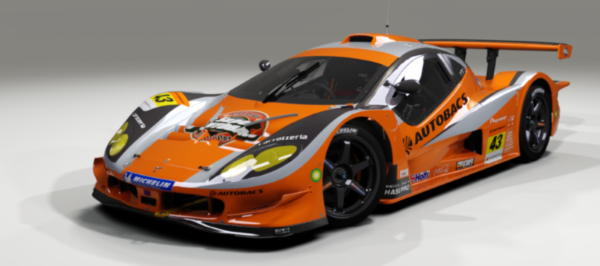
Some updates to the Autobacs ARTA Garaiya v2 GT300 JGTC (Super GT Series), which has always been incorrectly tagged as a GT500 car in the car folder name.
This was my favourite car in GT5/GT6 but the AC port always had a very weird driver posture which kind of ruined the experience for me in VR. He looked like a midget chewing his own knees as he sank through the seat.
The cockpit shading always looked kind of flat too.
Anyhoo, The Ghost Of Momma Bongos has tried to improve a few things, albeit within the confines of the very bizarre objects grouping.

v1.2m April 2024 by TGoMB
  • new driver steer.ksanim & posture (more appropriate to car ergonomics, less seat clipping, feet closer to pedals). Better for VR.
  • new shifting animation to work better with the new driver posture. Corrected the original hand/wheel synch.
  • individual driver suits, gloves and helmets added by config.
  • new skin colour schemes added for spec races, individually numbered, all based on original Autobacs livery.
  • extension folder added, some cockpit shaders revised to add depth/texture/reflection (limited by original object grouping).
  • some illuminated switchgear/instruments added to cockpit (again, limited by silly object grouping).
  • harness hidden as it was never deployed (some elements remain due to - you've guessed it - silly object grouping).
  • occluded sunlight penetration into footwells through bodywork/dashboard.
  • UI info updated.

1712311226255.png


Will overwrite the original car, so if in doubt... back up first.
 
This is no distant fog. It creates fog billboards in the near of your camera. And in its default settings its very efficient, because it uses th AI spline to place them. So it realy depends on the settings, but i tried to keep the CPU and GPU usage as low as possible due to many optimizations.

here is a comparison on and off:
View attachment 1343593

View attachment 1343594


It also depends on the tracks. so for small trakcs, you will see a lot of those billboards, because you already see billboards of the incoming spline. But for long tracks you will only have like a corridor where you move along some single road. But therefore you have more billboards on those long tracks.
@Peter Boese
Great feature, I love it already. Hope I can test it very soon. When do you plan to release?

But let me ask another question. As I saw, modders have to place the fog for the tracks by their own. Would it be possible to create this fog at random positions through an app or through Pure Config - can you implement such a feature? So the tracks need no extra work and this ground fog would be shown out of the box at all tracks?

I wish the new Nordschleife track DLC for ACC would have smoke or fog alone the track. Camfires are all over the place at 24 race :-)
 
can someone help me or give me a tip?
With the following MOD: URD darche 992 GT3-R 2023.

I don't see any active ads in the cockpit view.
..
So no speeds...temperatures...etc.

Is there a trick or do I have to download some font?
 
London ePrix Season9 v1.0

Screenshot_ks_alfa_romeo_4c_london_eprix_s9_8-2-124-18-20-5.jpg

The Formula E London ePrix was held with two back to back races at ExCel, in July 2021 with part of the circuit running around the arena and part of the circuit in the exhibition hall itself. The layout was further changed for the 2023 London ePrix, removing the old turns 17 and 18 to create a straight and reducing the length of the circuit to 2.09 km (1.30 mi). (Wikipedia)

Conversion from rFactor2.

-CSP recommended
-26 pit/start
-AI, cam

NOTE; If you are using Sol and the track screen is dark, rename ext_config_for_sol.ini to ext_config.ini in the extension folder.

Credits & Thanks;
rFactor2 Original Track by Garitt Gibsn and Errol Prefet
-Thank you for giving me permission

AC Converted by @shi (shin956)
Sections file by @Fanapryde
Crowds texture by @Kniker97
marshall, cameraman and some textures by kunos

Download (mediafire)

Enjoy.
Converted upon request by Patreon member Leo_J and Denver Thurston.
 
@Peter Boese
Great feature, I love it already. Hope I can test it very soon. When do you plan to release?

But let me ask another question. As I saw, modders have to place the fog for the tracks by their own. Would it be possible to create this fog at random positions through an app or through Pure Config - can you implement such a feature? So the tracks need no extra work and this ground fog would be shown out of the box at all tracks?

I wish the new Nordschleife track DLC for ACC would have smoke or fog alone the track. Camfires are all over the place at 24 race :-)
Like i said in the video, with no track adaption the fog varies with the altitude. So you have the fog and it is automatically thicker for "Mist" or "Fog" if you are on lower levels.

And actually also shown in the video, Pure Config has a spline editor, where you can create your own fog places on a track and you can save it as your custom adaption.

There are 3 files Pure will load in this priority:
  • your custom adaption
  • the tracks extension
  • pure's adaption which is shipped with Pure

So like for the Kunos tracks i already ship files for them.
For example if such file is loaded or one from a track modder you can still save your own version of this adaptions and it will be loaded automatically with higher priority.

1712319325614.png


You can even import ground fog adaption files. This is mainly used to import different Layouts from the same track.
 
Last edited:
Is there any folder or spreadsheet where I can find "faster ai" for the tracks? I've tried searching on this forum and on Overtake (formerly RD) and I got some, but in general terms it's a struggle to find them without searching one by one.

I also be satisfied if I can get the tracks uploaded with that new or "faster ai" files included. Thanks as always.

(Now I realise how important was to download immediately whatever that is released here, as you never know when that will be needed in the future and later it's harder to search)
 
Last edited:
Sharing a mod? Host it on GTPlanet Downloads. Free, public hosting for files up to 10GB in size.
Back