Assetto Corsa PC Mods General DiscussionPC 

  • Thread starter Thread starter daan
  • 152,044 comments
  • 46,499,880 views
there were rumours in this thread (cant find now) that someone had figured out ripping PC2 tracks but was not releasing the method until PC3 came out so they couldnt block the method, since that boat has now sailed wonder if that will come to light, there are some damn nice tracks in PC2 id love to see in AC,

PC2 - Azure Coast, :bowdown:Bannochbrae:bowdown:, California Highway, Mojave

and from the newer offering

PC3 - Monument Canyon, Tuscany, Wildcrest, Havana.

Whomever posted that up previously, if the person doing it needs a starting point, I'd say BANNOCHBRAE!!!!!! Pretty please with cherries on top..
Did anything ever come of this?
 
When I accelerate on some car mods, it keeps sliding sideways indefinitely, if anyone knows how to solve this problem, please let me know.
(MOD, CSP reinstallation has been performed)

The event is the same as the video at the end of this URL

 
Last edited:
They're not set up to work with the extended physics. Untick "Use extended physics" on the left side of the Drive screen for those cars and they should accelerate forward as expected.
Thank you very much!. I reinstalled the mod in question and unchecked "Use extended physics" and that solved the problem.
 
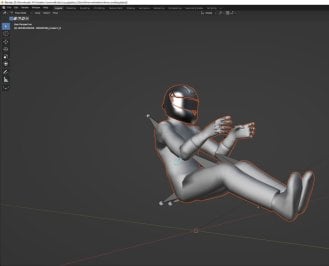
Any chance the gearstick shaft could be shortened so that the hand grips the gearknob during shifting? A two-min job in Blender would be time very well spent for any VR users.
Yes, this would be an easy task, but not the proper way. The gear shaft of this car was that long. Creating an fitting animation would be the proper way, but this dude here drives me nutz.
blend_2.JPG
There are so many videos at YT with really great animations, but not a single guy really explains how to create a shift animation. Must be the holy grail in Assetto.
Edit: or try this attached animation, which is closer to the gearknob has less clipping.
Before v1.3 Ive used the one from the "Porsche 911 Carrera RSR 3.0", but the hand was clipping through the gearknob. Didnt liked it, so I've tested at least three dozen anims until I found the one included. Yours is way better but clipping. Let me think about this, maybe I'll shorten the gear shaft by half of an inch or smtg like that. Thanks btw.
@Pfalzdriver add this to the config to stop sunlight lighting up the footwells through what should be solid objects:
This is a weirdo, all those objects are solid. :confused:

I'll wait until sunday before I'll include your stuff, maybe smtg else will come up till that. I've noticed myself being an idiot, including the wrong lods.ini to data.acd. Currently it uses the 15-45-200 as stated within the SDK, while I prefer 45-90-200, to keep LodA visible for a longer period of time. Those windows look bad in LodB, need to change this anyways. :)
 
When I accelerate on some car mods, it keeps sliding sideways indefinitely, if anyone knows how to solve this problem, please let me know.
(MOD, CSP reinstallation has been performed)

The event is the same as the video at the end of this URL


turn off extended physics. its broken on some cars. hope that solves it.
 
Nothing to see here, just another update

Did my final test run with the Porsch today and decided afterwards, its now good as it is. Many, many things were touched again, many minor problems solved, the biggest one was the downforce. Id like to thank @TonyBarracuda for pointing me to this issue. Now the car has proper 75kg of downforce at max speed.

Source: https://www.total911.com/1976-934-le-mans-winner/

Here just a quick overview of the changes, but tbf this list had to be a lot longer. I've made so many changes, the car drives now completely differently ... but that doesnt mean its easier to drive. :D

Code:
Version 1.5 by Pfalzdriver
- Decreased downforce to proper 75kg at max speed
- Reduced gear count to four
- Corrected tire size with optimised physics by Arch
- Adjusted brake torgue to match real braking distances
- Minor adjustments to suspension and engine curve, adjustable turbo
- Some fixes and additions to model and extension, e.g. rain tires textures

You can download the car as usual here at GTPlanet or Sharemods.

And please, stop finding any more errors! :lol: And yes, I know, rain tires in this area were not marked in blue. I couldnt find any picture with someone crazy enough driving the beasty in the wets. Its just a texture (in extension), so feel free to change it to your liking.

Oh, nearly forgot: Please make a new installation! I had to change two folder names in the skins of @MrHunt which contained "Umlaute." Is there even an english word for that?
Assetto Corsa doesnt have a problem with "Umlaute" tho, but an App we use for multiplayer racing does. It has the tendency to kick people from the server, so I usually avoid "Umlaute." :)

View attachment 1299641View attachment 1299642View attachment 1299643View attachment 1299644View attachment 1299645

Hello,
First of all, thank you very much for your fantastic work on this mod.
I have a question: is it normal for the turbo to be set to 0 by default?
1698919646363.png
 
Last edited:
Nothing to see here, just another update

Did my final test run with the Porsch today and decided afterwards, its now good as it is. Many, many things were touched again, many minor problems solved, the biggest one was the downforce. Id like to thank @TonyBarracuda for pointing me to this issue. Now the car has proper 75kg of downforce at max speed.

Source: https://www.total911.com/1976-934-le-mans-winner/

Here just a quick overview of the changes, but tbf this list had to be a lot longer. I've made so many changes, the car drives now completely differently ... but that doesnt mean its easier to drive. :D

Code:
Version 1.5 by Pfalzdriver
- Decreased downforce to proper 75kg at max speed
- Reduced gear count to four
- Corrected tire size with optimised physics by Arch
- Adjusted brake torgue to match real braking distances
- Minor adjustments to suspension and engine curve, adjustable turbo
- Some fixes and additions to model and extension, e.g. rain tires textures

You can download the car as usual here at GTPlanet or Sharemods.

And please, stop finding any more errors! :lol: And yes, I know, rain tires in this area were not marked in blue. I couldnt find any picture with someone crazy enough driving the beasty in the wets. Its just a texture (in extension), so feel free to change it to your liking.

Oh, nearly forgot: Please make a new installation! I had to change two folder names in the skins of @MrHunt which contained "Umlaute." Is there even an english word for that?
Assetto Corsa doesnt have a problem with "Umlaute" tho, but an App we use for multiplayer racing does. It has the tendency to kick people from the server, so I usually avoid "Umlaute." :)

View attachment 1299641View attachment 1299642View attachment 1299643View attachment 1299644View attachment 1299645

thank you for the car! beautifull

Nope, I think engine.ini is missing DEFAULT_TURBO_ADJUSTMENT, and falls back to 0%.
I don't have ABS though..:confused:
and you should not) its very good without aBS as in real, if you race on wheel and pedals
 
Last edited:
RENAULT CLIO UK CUP 3 SKINS 2K/4K/6K

OG mod creator: Shokeus

2 skins are loose replica's and the dark blue is fictional but in keeping with the rest. A big shoutout to Low-life drift mafia over at discord for sorting the window AO out for me in 3d software and other bits and bobs that i do not understand without him i would not of skinned this car, if it has no window map it wont get skinned by me, its that simple.

the entire car is in my download due to changing a few shader values and an updated kn5 file

the lower res skins are in the cars main folder under "lower_res_skins" if you want a 4k or 2k, default fitted is 6k

i have put an ext_config file in all skins to remove the rear wiper arm (on track) due to the wiper arm getting splats of paint over it when the mouldings are painted there is nothing i can do about this it is a poor mapping issue, also the tops of the rear lights get a lovely line of paint because they are also mapped along with the side mouldings, of course i cant hide the rear lights for obvious reasons so i decided to roll with it as i do not like the side plates without the painted mouldings, if you would rather have the wiper arm back remove the ext_config from the skins folder thats all that file does nothing more. If you wanted all mouldings black and no splashes of paint on the rear wiper arm/rear lights remove the ext_config and also remove the "rgba#010101ff.dds" file but be warned this will remove all colour from the mouldings and leave them black. You can pick and choose what you do and do not want.

drag and drop into CM to install.

sweet as nut 🍻


View attachment 1299457View attachment 1299458View attachment 1299459
This seems like a great car to have a ton of skins for a la Littlebird haha

Does anyone have a solid guide for alpha layers on PSD for window decals? My current method is fumbling, copying and pasting from existing skins, and taking too long before I finally McGuyver it and completely forget how I ever did it. Rinse and repeat
 
I uploaded a bunch of 4x1 lattice-frame adboard textures to RD, in case any track makers or skin creators want them.

10.png

111.png

4x1.PNG
 
This seems like a great car to have a ton of skins for a la Littlebird haha

Does anyone have a solid guide for alpha layers on PSD for window decals? My current method is fumbling, copying and pasting from existing skins, and taking too long before I finally McGuyver it and completely forget how I ever did it. Rinse and repeat
if it helps you can have the pdn so you can go into it and open up the layers not sure if that would be beneficial to you or not
 
if it helps you can have the pdn so you can go into it and open up the layers not sure if that would be beneficial to you or not
That is a Paint.net file right? Would that open the .dds files any different than Photoshop does?

If not, it seems like I'd have to have that file type as given by the modder as a part of the template. For this template folder it just has the .dds that I'd normally export out of CM
 
That is a Paint.net file right? Would that open the .dds files any different than Photoshop does?

If not, it seems like I'd have to have that file type as given by the modder as a part of the template. For this template folder it just has the .dds that I'd normally export out of CM
i'm affraid i do not know the answer to that questiion all i no is with the OG paint.net file you are able to go into the layers and maybe acheive what you are looking to do..........i am not 100% sure all i can really do is offer
 
There's the Ytanguy, Neel Jani version converted by Sliderman. Still WIP, but personal matters are in the way of further development lately. Last changes are from late July. It does look good already, but it's going to be a while before it will get published I'm afraid.

View attachment 1299474
Here are some actual screenshots:
1698941558494.png


1698941965156.png


1698942046466.png


1698942803263.png


1698942847598.png


1698942888990.png


1698942930300.png


1698942980506.png


1698943004626.png

Sorry you all, I actually don't have much time to do anything in AC at the moment.
As far as I remember is Beez almost done, but I haven't even had time to contact Ytanguy or Neel Jani. I don't even know how to get permission to post from them. If someone could help, that would be great. :)

I'm hoping to have a little more time around XMas. Then I could try to get a halfway finished stand.
Otherwise, I can only publish what is there at the moment and someone else could finish it afterward. Seasonal stuff e.g. fine-tuning etc.

At the moment lights, 30 pits, slightly better background when you drive down the mountain and look at the bridge construction, lots of animals, vegetation, rain etc. are, more or less, finished. But I'd have to get back to it myself first to see what's still missing.
Sorry, RL kicked in hard. 🤷‍♂️
 
can anyone help, have been away for a while now and come back to a new pure etc.

i cant get the new controller to work in career and championships

i tried what the guide pdf says but theres no weather_fx.ini in x:\SteamLibrary\steamapps\common\assettocorsa\cfg

any idea where ive gone wrong
 
Last edited:
Sorry, it's been a while since I posted about Pescara 1957 (again). I've been plugging away, working on my to-do list - it is now a mere 39 items long :D
I'm getting there, working full time and more on it with no income at all currently, so I'm as keen to release it as some of you probably are to play it! :lol:

I've made the buildings closest to turn one in the mid distance, the train station and silos, sanctuary... ready to fill in the city behind with more generic buildings.
Sorry for the wait!
grab.jpg
 
Last edited:
Sorry, it's been a while since I posted about Pescara 1957 (again). I've been pluggin away, working on my to-do list - it is now a mere 39 items long :D
I'm getting there, working full time and more on it with no income at all currently, so I'm as keen to release it as some of you probably are to play it! :lol:

I've made the buildings closest to turn one in the mid distance, the train station and silos, sanctuary... ready to fill in the city behind with more generic buildings.
Sorry for the wait!View attachment 1300090


Never a need to apologise sir, thanks for the amazing looking job you're doing - if it's anything like as good as Napoli it'll be well worth the wait.
 
Hello! How are you? I would like to know how to create this type of skin. I just change colors with mipmap, but I would like a tutorial. Congratulations. The skins were great.
Sorry I don't have (a link to ) a tutorial ... but there was one person here who wrote the other day that they were following a tutorial ... o wait, that was you! :)

I just experiment with the values until the result is pleasing to the eye ... You can see the changes in real time when saving the ext_config.ini (in Showroom or an in-game session you see the changes take effect as you save the ini file- no need to open a session each time after a change of parameter)
Not really a need for a tutorial that way , you'll get the hang of it soon enough!

And for getting the colorcodes I use https://colorpicker.me (but you can use any tool of choice for that.)
 
Here are some actual screenshots:
View attachment 1300003


Sorry you all, I actually don't have much time to do anything in AC at the moment.
As far as I remember is Beez almost done, but I haven't even had time to contact Ytanguy or Neel Jani. I don't even know how to get permission to post from them. If someone could help, that would be great. :)

I'm hoping to have a little more time around XMas. Then I could try to get a halfway finished stand.
Otherwise, I can only publish what is there at the moment and someone else could finish it afterward. Seasonal stuff e.g. fine-tuning etc.

At the moment lights, 30 pits, slightly better background when you drive down the mountain and look at the bridge construction, lots of animals, vegetation, rain etc. are, more or less, finished. But I'd have to get back to it myself first to see what's still missing.
Sorry, RL kicked in hard. 🤷‍♂️
Wowww that looks fantastic! Truly appreciate the hard work and effort that went into this. Really awesome!

I know Rainmaker frequents these parts, he's done several of Neel's tracks so maybe he could help get that sorted. There is a forum: Neel Jani's Tracks Forum I don't know how active it is - maybe that could help. Don't worry about RL getting in the way, it happens. I'm grateful that you've gotten it this far, I'm excited about the future Beez action lol

https://italotracks.sellfy.store/

GP Napoli 1934-57, working on Pescara 57, Livorno (Montenero) 1922-1947, San Remo 1947-1951... and others
You are an absolute HERO. I'm legit excited about Pescara and the other tracks on your list. Montenero, San Remo... WOW, this is excellent news for every historic enthusiast here.
 
speaking of Napoli @Italotracks any chance to extend the pitboxes to about 24-25 ?
Would love to use the track within some more championships, unfortunately its failing by limited number of boxes.
It's been a while so my memory might be hazy, but I do remember having a few problems getting the AI to behave in the pits. I'll have a look though and let you know.

You are an absolute HERO. I'm legit excited about Pescara and the other tracks on your list. Montenero, San Remo... WOW, this is excellent news for every historic enthusiast here.
Thanks!
Hopefully Pescara works out well and I can keep going. AC2 is on the horizon next year, hopefully it will be similarly modding friendly..

Never a need to apologise sir, thanks for the amazing looking job you're doing - if it's anything like as good as Napoli it'll be well worth the wait.
Thanks Rodger! :cheers:
 
The Porsche 911 Carrera RSR "Evolution Modding GTR2" skins, none of them "fit" the Porsche Carrera RSR versions.
I had to adapt/import the model (but the rear view mirror was left over), but at least we will have the Porsche 911 Carrera RSR (Le Mans 1974/1975), already adapted.

A sample of the German team "Gelo Racing Team" from 1975 with its 3 cars.
 

Attachments

  • __custom_showroom_1698974788.png
    __custom_showroom_1698974788.png
    62.8 KB · Views: 28
  • __custom_showroom_1698974813.png
    __custom_showroom_1698974813.png
    52.2 KB · Views: 24
  • __custom_showroom_1698974834.png
    __custom_showroom_1698974834.png
    65.9 KB · Views: 27
  • __custom_showroom_1698974943.png
    __custom_showroom_1698974943.png
    79.2 KB · Views: 29
I think it might only be INT_COURO that's the culprit, the other two were part of the testing process.
That makes it even weirder. INT_COURO is only used in COCKPIT_LR. If Id only remember why I used a material only in LR ....

I'll just include this snippnet with the extension and all should be fine. Already shortened the gear shaft a tad, now everyone should be happy with the animation. :)
is it normal for the turbo to be set to 0 by default?
Fixed soonish. :) Stupid modder forgot to set it. Last minute decision to make it adjustable, bc irl it was adjustable. :banghead:
I don't have ABS though.
This car never had ABS or TC in reality, so it wont have ABS or TC ingame.
 
Sharing a mod? Host it on GTPlanet Downloads. Free, public hosting for files up to 10GB in size.
Back