Assetto Corsa PC Mods General DiscussionPC 

  • Thread starter Thread starter daan
  • 151,483 comments
  • 46,224,177 views
Both links have been updated to new versions with a really stupid change, but it was something that always bugged me. I finally got around to fixing it for myself and figured I would post it for anyone interested. If this didn't bother you, you can skip this update because nothing else has changed.

-- Separated the meshes on the transmission towers so I could isolate the wires and apply the @Masscot cable fix. Now they didn't look so blocky and jagged.
I can appreciate this kind of passion.
 
Last edited:
Sometimes it seems like there are people who think that we can only play one racing game. In my case, I would be happy to play AC some days, and other days another game like AC EVO. In fact, if it weren't for AMS2 having such bad physics and worse FFB, I would play them both. And for that same reason, I wouldn't mind AC EVO being a game like AMS2 but with good physics and FFB even if it doesn't support modding. For modding we already have AC, so what's the point of expecting AC EVO to be a rehash of AC.
because of certain things, like maybe they will add timed races, maybe better random weather support, AI could be updated to allow better racing for multiclass racing, etc....
 
Safer races and less dumb overtakes gone wrong for RT Oulton Park 1.7 International 2022 layout. (rt_oulton_park)


Let me know how it goes, try some big v8 things. you can pump up the aggression setting, now.
You know you want to race v8s, even in your bathroom.


UPDATE: it still needs to be a bit tighter, will look into it later.
I think I'm done here...file updated.

Gone from 10 DNFs per race to hardly one.
Oh, the power of [DANGER_X] zones in ai_hints.ini

Power GIF


The Gt1s like it there :)


Oh, and Buon Ferragosto to all paisàs and to anyone wishing to partake.
 
Last edited:
I think I'm done here...file updated.

Gone from 10 DNFs per race to hardly one.
Oh, the power of [DANGER_X] zones in ai_hints.ini

Power GIF


The Gt1s like it there :)


Oh, and Buon Ferragosto to all paisàs and to anyone wishing to partake.
It is a secret weapon. I used maybe 25-30 zones in my DC Street Circuit AI - similar numbers for the few other projects I'm working on (too lazy/busy to finish... :gtpflag:)

Even the best modders out there, like JohnR and LilSki, don't use it enough. It can dramatically improve AI racing.


Now if only Ilja would focus less on gravel/Rally and more on AI behaviors...
 
Last edited:
X90
It is a secret weapon. I used maybe 25-30 zones in my DC Street Circuit AI - similar numbers for the few other projects I'm working on (too lazy/busy to finish... :gtpflag:)

Even the best modders out there, like JohnR and LilSki, don't use it enough. It can dramatically improve AI racing.


Now if only Ilja would focus less on gravel/Rally and more on AI behaviors...
Not counting Nuzzi's which is recent history, basic racing rules missing in a racing simulator, Kunos never had them in and so will CSP. Since 2014 people are racing this thing in a broken fashion or just online. Or hotlapping. Or not racing at all. Or not driving at all.
If this isn't the best comedy.
And, what @giorgos_nes wrote.

Oh no, the best is people already vouching for EVO.
 
It wouldn't hurt having at least some info about what those different engine maps are, though...
Hi ! ;)

I want to thank you again for your help, now I mapped as well my wheel.

So and you are aware about it, there wasn't any information in the PDF about it.
For our community, the 3 engine maps for this car are :
  • 0 (the default one)
  • 1 (more "power")
  • 2 (full "power")

From my side on the vanilla Mugello track, I noticed a gap around 0,7" between the 0 and 2.

Cheers.:cheers:
 
Anyone have some recommended tutorials for 3D Skinning on Photoshop for AC? I've created a ton of 2D skins so I am very familiar, but since RSS releases 3D templates for their cars, this is probably a good time to learn since it feels like I'm playing the guessing game a lot of the time with the 2D

I'm converting a full grid of custom F4 cars I made from their old Mygale to their 2024 and the mapping is much more complicated than it used to be lol
 
Released : Nissan Pennzoil Nismo GT-R '99
Author:F302
3D Model: Polyphony Digital
Texture Update : F302 (rework)
Skins: F302 (Body Mapping)
3d work:F302
hope u enjoy the Car
ps : send feedback ,bugs ,missing things
tested on CSP 0.1.80-preview115
PP filer GT_Sport 1.4

knowing bugs: shift animation

have fun!

To install, move folders to "...\SteamApps\common\assettocorsa" or simply
drag'n'drop archive to Content Manager.
Download: https://www.mediafire.com/file/36gmnruhyzn0vhz/f302_nissan_r34_gt500.zip/file


View attachment 1308533View attachment 1308534
Does anyone know, if there are skins for this version?
 
Anyone have some recommended tutorials for 3D Skinning on Photoshop for AC? I've created a ton of 2D skins so I am very familiar, but since RSS releases 3D templates for their cars, this is probably a good time to learn since it feels like I'm playing the guessing game a lot of the time with the 2D

I'm converting a full grid of custom F4 cars I made from their old Mygale to their 2024 and the mapping is much more complicated than it used to be lol
@MikeontheMic 3D templates in photoshop works as 2D ones, with the difference that they can provide live result on the 3D model.

Be aware that on newer version of Photoshop 3Dsupport is discontinued because Adobe wants you to use their "new", separately paid even on the full plan, tool called Substance (Stager, Painter, Sampler and Designer).

This is a 100% true info since in real life i'm a brand and graphic designer and i use Adobe stuff on daily basis and i pay the, expensive license, every month for the joy of my bank account :lol:
 
Last edited:
Does anyone know, if there are skins for this version?
Yes. There's one. AND, it's the 1999 championship-winning car 🤪

jk,jk... No, not that I've found. Mind you, this is the AO, so that would explain the dearth.

132.png


PS. Please don't nag @JK1977, he's busy making many, many majicks for us 🤣
 

Attachments

  • 132.png
    132.png
    27.6 KB · Views: 10
Last edited:
Hi everyone.
I’m facing to a visual issue with the 1998 Mclaren MP4/13 made by Virtual Simulazioni and updated by Ponz.
It appears when using AC alone or with Content Manager and CSP.

When the camera is far from the car, the driver head is not correctly positioned (looking to the ground) :
1723739108995.png

Then when the car is close enough to the camera, the driver model is updated and you can see the helmet correctly positioned.
1723739155203.png


In content manager, the car preview picture shows the same problem.
Using the CM_showroom , I moved the driver vertically to understand its positioning.

Default one :
1723739242786.png

Comparison with the F2004 by Kunos:
1723739301126.png

Comparison with the F399:
1723739329993.png


The default driver is not good, his head is really looking to the ground.

I know there is a solution to correct it with Content manager by deactivating the option “limit some things if there are a lot of cars” in the Content Manager menu : Custom Shaders Patch/General settings/CPU optimization.

This solution works but it‘s kind of a workaround, not totally satisfying.

Do you guys know how to correct or replace this default driver?

Some ineffective tests I've made below :

First, modifying the choice of the driver model in the “driver3d.ini” file does not change anything. I tried with several driver models, the result was always the same.

Secondly, I tried to modify the use of lods by changing the camera distances in the “lods.ini” file, to force the use of the most detailed lod, but it still changed nothing.

Thanks for your help!
 
Work is going much faster than I thought (I attach some screens as usual). But there's a problem: the GTR and the M have the exhausts in two different positions. Is there a way to manage the flames in relation to the location of the exhaust? I mean I would like them to come out only where the exhaust is, based on the version. It would be a shame to have to remove them :confused:
 

Attachments

  • Screenshot_paddock_z3m_rj_imola_2024_15-7-124-12-55-38.jpg
    Screenshot_paddock_z3m_rj_imola_2024_15-7-124-12-55-38.jpg
    181.3 KB · Views: 18
  • Screenshot_paddock_z3m_rj_imola_2024_15-7-124-12-55-42.jpg
    Screenshot_paddock_z3m_rj_imola_2024_15-7-124-12-55-42.jpg
    111.4 KB · Views: 15
  • Screenshot_paddock_z3m_rj_imola_2024_15-7-124-12-56-3.jpg
    Screenshot_paddock_z3m_rj_imola_2024_15-7-124-12-56-3.jpg
    101.2 KB · Views: 16
  • Screenshot_paddock_z3m_rj_imola_2024_15-7-124-12-56-13.jpg
    Screenshot_paddock_z3m_rj_imola_2024_15-7-124-12-56-13.jpg
    101.3 KB · Views: 17
  • Screenshot_paddock_z3m_rj_imola_2024_15-7-124-12-56-18.jpg
    Screenshot_paddock_z3m_rj_imola_2024_15-7-124-12-56-18.jpg
    91.1 KB · Views: 16
Hi everyone.
I’m facing to a visual issue with the 1998 Mclaren MP4/13 made by Virtual Simulazioni and updated by Ponz.
It appears when using AC alone or with Content Manager and CSP.

When the camera is far from the car, the driver head is not correctly positioned (looking to the ground) :
View attachment 1381233
Then when the car is close enough to the camera, the driver model is updated and you can see the helmet correctly positioned.
View attachment 1381234

In content manager, the car preview picture shows the same problem.
Using the CM_showroom , I moved the driver vertically to understand its positioning.

Default one :
View attachment 1381235
Comparison with the F2004 by Kunos:
View attachment 1381236
Comparison with the F399:
View attachment 1381237

The default driver is not good, his head is really looking to the ground.

I know there is a solution to correct it with Content manager by deactivating the option “limit some things if there are a lot of cars” in the Content Manager menu : Custom Shaders Patch/General settings/CPU optimization.

This solution works but it‘s kind of a workaround, not totally satisfying.

Do you guys know how to correct or replace this default driver?

Some ineffective tests I've made below :

First, modifying the choice of the driver model in the “driver3d.ini” file does not change anything. I tried with several driver models, the result was always the same.

Secondly, I tried to modify the use of lods by changing the camera distances in the “lods.ini” file, to force the use of the most detailed lod, but it still changed nothing.

Thanks for your help!
@shi posted a fix few months ago, search in the forum, you'll find it easier
 
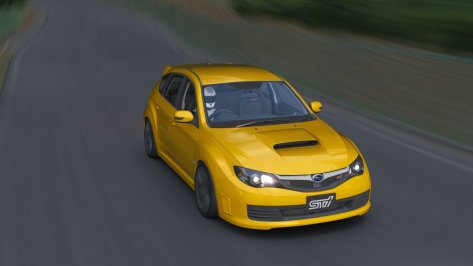
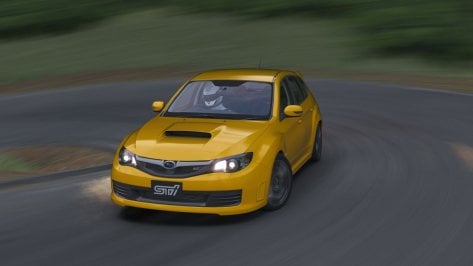
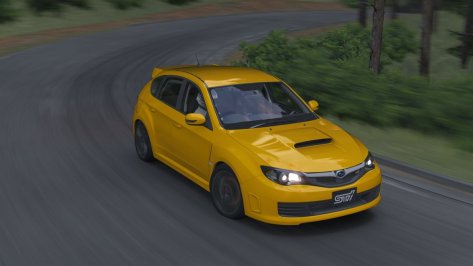
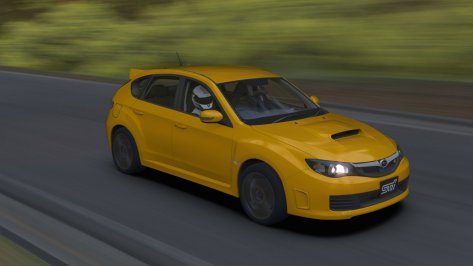
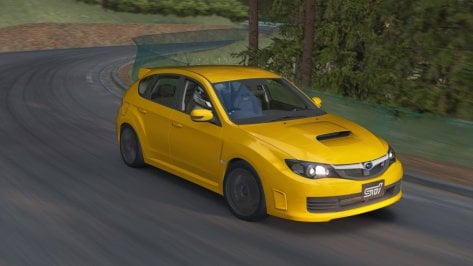
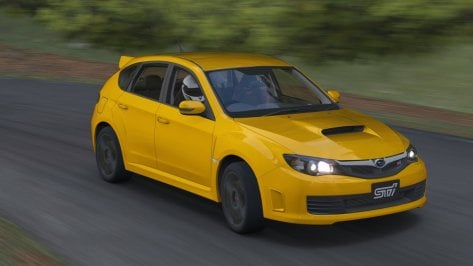
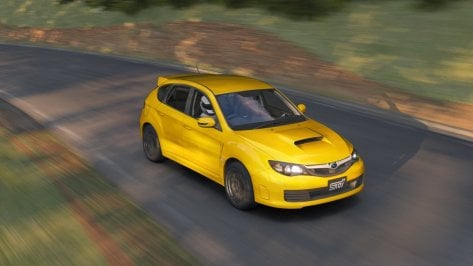
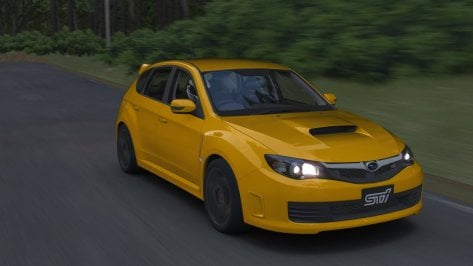
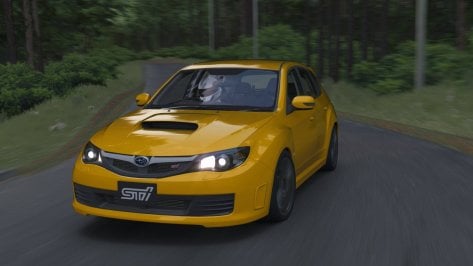
Subaru Impreza WRX STI spec C 2009 Public Release!!
Download:https://sharemods.com/hxye3davvht3/sti_spec_c_2009_101creative.zip.html
Converted From GT6
-AO inside and out
-Realistic Dashboard
-Physics
-CSP Settings
-Driver Animation
-Panoramic session Start config Daniel Nogal
-Beta testing and help ,@norms,@Mascot,and others
Garage ACTK help:
-COCKPIT_HR updated
-Add LODs
-Update collider.kn5

Screenshot_sti_spec_c_2009_pk_gunma_cycle_sports_center_15-7-124-18-2-31.jpgScreenshot_sti_spec_c_2009_pk_gunma_cycle_sports_center_15-7-124-18-2-8.jpgScreenshot_sti_spec_c_2009_pk_gunma_cycle_sports_center_15-7-124-18-1-18.jpgScreenshot_sti_spec_c_2009_pk_gunma_cycle_sports_center_15-7-124-18-0-26.jpgScreenshot_sti_spec_c_2009_pk_gunma_cycle_sports_center_15-7-124-17-59-55.jpgScreenshot_sti_spec_c_2009_pk_gunma_cycle_sports_center_15-7-124-17-59-31.jpgScreenshot_sti_spec_c_2009_pk_gunma_cycle_sports_center_15-7-124-17-58-50.jpgScreenshot_sti_spec_c_2009_pk_gunma_cycle_sports_center_15-7-124-17-58-26.jpgScreenshot_sti_spec_c_2009_pk_gunma_cycle_sports_center_15-7-124-17-58-21.jpg
 
Work is going much faster than I thought (I attach some screens as usual). But there's a problem: the GTR and the M have the exhausts in two different positions. Is there a way to manage the flames in relation to the location of the exhaust? I mean I would like them to come out only where the exhaust is, based on the version. It would be a shame to have to remove them :confused:
you can adjust the flame position in CM, what i have done before lets say there is 4 flames coming out and i want only 1, i take the full .ini file (with 1 exhaust flame from another car) and then change the position in CM showroom.
i may be missing what you mean if i do i apologise. pretty drunk so my head is mush right now.
 
Work is going much faster than I thought (I attach some screens as usual). But there's a problem: the GTR and the M have the exhausts in two different positions. Is there a way to manage the flames in relation to the location of the exhaust? I mean I would like them to come out only where the exhaust is, based on the version. It would be a shame to have to remove them :confused:
You can move the flames position in the showroom. just select the flames in the showroom menu and press "T", then you can move the flames to the position you want. then you can save the new moved position points.

Edit: just saw maximeerkat already answered the same😅
 
Last edited:
has someone here a rain fx for the melbourne tracks?
[RAIN_FX]
PUDDLES_MATERIALS = $PUDDLES__track, asp-grp, asp-pitlane, Road_out, pitlane, Toppa_asp, green_tarmac
PUDDLES_MESHES =
SOAKING_MATERIALS = $SOAKING__track, asp-grp, asp-pitlane, Road_out, pitlane, Toppa_asp, green_tarmac
SOAKING_MESHES =
SMOOTH_MATERIALS = $SMOOTH__track, marquee_lrg_a, marquee_med_a
SMOOTH_MESHES =
ROUGH_MATERIALS = $ROUGH__track , mel_infield_b_01_d, Bordo_erba,Sand, wsmdry_drt!0
LINES_MATERIALS = $LINES__track, uvrmblea_c, uvyellow_line, decal_lines_white, Striscia_PIT, decal_lines, Cherb
RELIEF_MATERIALS = $RELIEF__track
STREAM_EDGE =
STREAM_POINT =
 
Sharing a mod? Host it on GTPlanet Downloads. Free, public hosting for files up to 10GB in size.
Back