
- 1,873

- Chicago, USA
My self-portrait for every CSP update.

My self-portrait for every CSP update.


Strange, you have copied all the 4 tvr_*.kn5 files. It should work.It was worth trying, but as soon as I remove the pctm version, the ACL stops working...


Half trolling. I did discover a few tracks where the grass fx seemed overscaled (trunk sized on the overgrown ones, or completely out of proportion, and out of where they should be), and with all the latest small bugs we encountered i though it was worth sharing the solution rather than play with the grass fx settings for half an hour like i did.This statement makes absolutely no sense and is factually illogical, are you trolling?
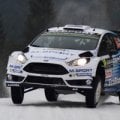

Maybe stupid question so pardon me but is the Kunos GT40 and the GT40 MK1 of the latest WSC pack the same car (I think about to delete either the kunos or the bazza one, for disc-space reason)?


I can’t check anymore because I binned it, but yes, that is exactly how it was.Strange, you have copied all the 4 tvr_*.kn5 files. It should work.
Check if the folder structure. It should be like this
cars\ac_legends_gtc_tvr_griffith_200\extension\data_override
and inside it you shoul have the modded lods.ini file

When Bazza Showed off this preview for WSC69 Pack (https://www.gtplanet.net/forum/threads/assetto-corsa-pc-mods-general-discussion.307899/post-13902063)Basically, WSC one is the 66-67 car and Kunos one is the 68-69 car. I would recommend keeping both, as a future WSC mod may use the latter version with the wider tyres and the larger engine.


Hello
a belated happy new year.
After i installed CSP 0.2.7p1 today, an orange square appears in the top left during races or trackdays. With Mouse over the square: "a delay in data stream from the server".
View attachment 1419362
However, there are still no delays or anything similar.
training or hotlaps works fine . no orange square appears.
If i go back to CSP 0.2.6p1, the message doesn't appear.
Can anyone imagine where this could be coming from?
btw, a second PC - same problem.
Thx - Rob

Ive been changing every setting I possibly could thinking it was something I didn't realize I messed with causing this. it must have been in the latest 2.6 updates...I just downloaded 2.7, Im gonna test and see if it has went away.Oh.. & if someone finds a solution for the "ghosting stripes" on tarmacs, please post the solution! It drives me crazy, to the point that i can't play the game! Thanks!

Thats the self shadowing issue we have been talking about.Also called shadow acne.Its not supposed to be there and it didnt use to be.Between the "stop" signs, if that's visible! It's pretty obvious when you're driving though!


Usually it's the Blur in ExtraFX. You can try to keep it under 5% with 50-60% of noise. With the "tunnel" blur shader in the latest pure, i deactivated it in ExtraFX completely.View attachment 1419377
anyone know how to "fix" the motion blur artifacts and the ground going above the tires? Is the ground a track issue?


Great...so a choice between shadow acne or objects not being attached to their shadows. yayTO EVERYBODY WHO HAS THAT GODAWFUL SHADOW BANDING ON TRACKS:
CSP\SETTINGS\GRAPHICS ADJUSTMENTS
THIS IS NOW TICKED BY DEFAULT.
UNTICK IT.
View attachment 1419382
Instant solution for me.
@Alx Hill @Tetri @Swisss @Triplexbee @Steve Hayward @Valyul @I_R_Brainiac @leBluem

Got an example? Shadows all appear normal to me on quick examination.Great...so a choice between shadow acne or objects not being attached to their shadows. yay
 modsfire.com
Got an example? Shadows all appear normal to me on quick examination.


 sharemods.com
Same as you, but without the thumbnail for some reason.View attachment 1419391
could you show me what settings you have here?
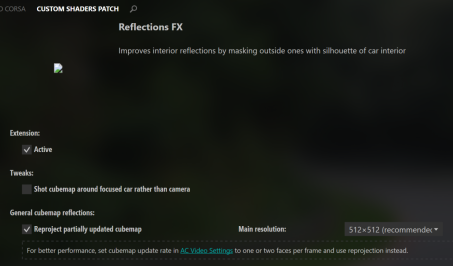
I used to see it all the time with fence post and stuff but now that you ask Its not there anymore.This may be the reason for the self shadowing with it enabled.Before you needed it enabled to have a proper connection to the object.But if something changed ,now the same setting is causing self shadowing but objects no longer need it enabled.Got an example? Shadows all appear normal to me on quick examination.

can u maybe add the loeb test skin to the 2008 red bull? or can someone maybe create it for us all?Quick feedback
What have you liked about the new 2008 mod vs the old one
What would you like to see added to the 2007 mod?
Those do look better...and YAY! I hit one.Not doing a full track update for this because it's easy enough to enable as a skin if you want to. Maybe one of these will make it into the next full track update if there ever is one.
Two haybale skins for my Spa66 track to make the bales look better, IMO. The first one (Haybales) uses the default texture but makes it look more detailed. The second one (Haybales2) does the same as the first but gives a more yellow appearance to the hay. You can see the difference in the attached pic. The bale closest to you is the default look. The next closest is the Haybale skin and the rest are the Haybale2 skin. Just download the attached zip file and enable the skin you prefer in CM.
View attachment 1419412



Hi.
It’s ashame it alters your settings. Would be good if these were saved. It’s a mine field trying to find things that have messed up your settings.TO EVERYBODY WHO HAS THAT GODAWFUL SHADOW BANDING ON TRACKS:
CSP\SETTINGS\GRAPHICS ADJUSTMENTS
THIS IS NOW TICKED BY DEFAULT.
UNTICK IT.
View attachment 1419382
Instant solution for me.
@Alx Hill @Tetri @Swisss @Triplexbee @Steve Hayward @Valyul @I_R_Brainiac @leBluem


You truly are the gift that keeps on giving, JoeNot doing a full track update for this because it's easy enough to enable as a skin if you want to. Maybe one of these will make it into the next full track update if there ever is one.
Two haybale skins for my Spa66 track to make the bales look better, IMO. The first one (Haybales) uses the default texture but makes it look more detailed. The second one (Haybales2) does the same as the first but gives a more yellow appearance to the hay. You can see the difference in the attached pic. The bale closest to you is the default look. The next closest is the Haybale skin and the rest are the Haybale2 skin. Just download the attached zip file and enable the skin you prefer in CM.
View attachment 1419412


Here we go:
I think some thumbnails disappeared in one of the recent CSP updates, but they could be recovered manually; I think I read somewhere on here how to fix it, but I haven't been able to find where it was explained, let's see if anyone remembers...Same as you, but without the thumbnail for some reason.


